Vision For Vision - Image to Speech Translation
Erik Pheng Kong Chang, Isha Padmanaban, Lakshmi Muraleedharan Nair (Dropped course)
Links
Motivation
The problem we are trying to solve is providing access to digital images for the visually impaired. In 2022, 2.2 billion people are reported to have a near or distance vision impairment. This means that many of them have limited access to the digital world as most of it is reliant on sight. One way that visually impaired people navigate the internet is through text to speech applications. However, this method does have its limitations because these simple text to speech solutions cannot read the text from images. Thus, we propose Image to Speech Translation solution which takes an input image and extracts text from it. The extracted text is translated to speech.
This problem is important because it allows visually challenged people to get a deeper enjoyment and utilization of the internet and perhaps help them navigate the outside world. Ultimately, this all allows them to be more autonomous in the real world and online.
Literature Review
Image Pre-processing
Low resolution, low contrast, high noise, and distortions are some challenges faced while retrieving text from images. The input images should be enhanced to obtain the exact text. One way of achieving this is by using computer vision OpenCV and Python libraries for Image Processing. Karun et. al. [3] explored the idea of extracting text from an image in a dynamic low light environment after eliminating noise. After capturing the input image, Fujii et al. [4] converted it to a gray scale image and then applied the required filtering with the help of Gaussian filter to reduce noise. We are incorporating image pre-processing steps such as thresholding and noise removal in our project to get accurate text from the image.
Image to Text
Qi Zheng used segmentation algorithm to recognise characters with the help of multiple-size sliding sub-windows. After getting template images first, the SIFT features are extracted and matched with that of the template images. With this, multiple single-character-areas are found and are validated using a voting and geometric verification algorithm [7]. Text is extracted from images currently using OpenCV OCR. This OCR utilizes a deep learning model for text recognition that is highly accurate. But it requires the images to be captured in certain angles which is not ideal in real world. We are using Tesseract OCR for text extraction as it works effectively on different kinds of recognition such as images with words, text blocks and vertical text.
Text to Speech
Yuxuan et al. [5] proposed a text-to-speech (TTS) model named Tacotron that is end-to-end and is capable of generating speech directly from characters. When text and its corresponding audio are given, the TTS model is trained completely from scratch to convert a new text file to audio. We are using open source TTS solution by Mozilla in our project for text-to-speech translation.
Proposed Solution
The solution to our proposed problem requires three main steps - Image Pre-processing, Image to Text with OCR, Text to Speech synthesis.
Step 1: Image Pre-processing
Below are the important pre-processing techniques we applied on the input image to enhance the quality of the image and extract the right text. We are using the OpenCV python package for this purpose. This step will greatly improve user experience and eliminate some of the current limitations of the OCR systems.
- Grayscale Conversion : We are using OpenCV cvtColor function to convert the colored image to grayscale image.
- Threshold and Binarization : This step converts the grayscale image into a binary image with only black and white color. This is done so that Tesseract OCR can identify text easily.
- Noise Removal : We used openCV erode and dilate method to remove small white noises and increase the object area of the input image. We applied median blur filtering technique to preserve the edges of image while removing noise.
Step 2: Image to Text
We used open source Tesseract Optical Character Recognition engine for obtaining text from images [6]. This library is proven to provide better quality output. We provided the required configuration settings in a Python program to read through categories such as texts, numbers and special characters from images and output them with acceptable level of accuracy. This needed trial and error effort to find the right configuration for each of the categories. We have tested the code with rich set of images including images with short words, magazines, and handwritten notes to validate the correctness of the module.
Step 3: Text to Speech
In this final step, the resulting text is sent to the text-to-speech solution. We used an open source TTS solution by Coqui, which is derived from the Mozilla TTS solution. This TTS solution is made up of three components, the TTS model itself, the dataset used, and the vocoder model. We used the pretrained TTS model known as Tacotron2 with Dynamic Convolutional Attention (Tacotron2 DCA). We then used the LJSpeech dataset, which is a public domain english speech dataset and for the vocoder model we chose the Multi-Band MelGAN because it was the fastest model.
Results
Below are some of the interesting results we have obtained.
| Input Image | OCR output | TTS output | Comments |
|---|---|---|---|
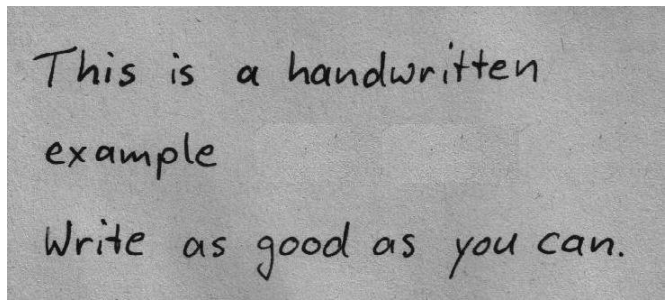 |
This is a handwritten example Write as qooal as you can. |
Handwritten text. Image pre-processing is not done. Tesseract output is not accurate. |
|
|
This is a handwritten example Write as good as you can. |
Handwritten text. Proposed image pre-processing is applied. Tesseract output is accurate. Shows the importance of our pre-processing techniques |
|
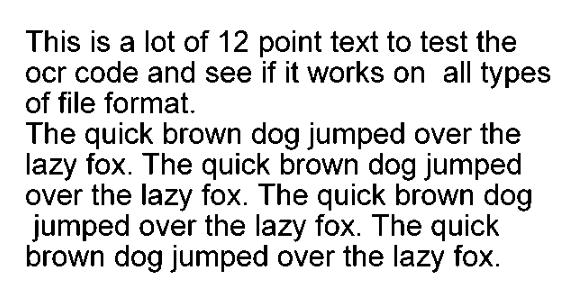 |
This is a lot of 12 point text to test the ocr code and see if it works on all types of file format. The quick brown dog jumped over the lazy fox. The quick brown dog jumped over the lazy fox. The quick brown dog jumped over the lazy fox. The quick brown dog jumped over the lazy fox. |
Printed text | |
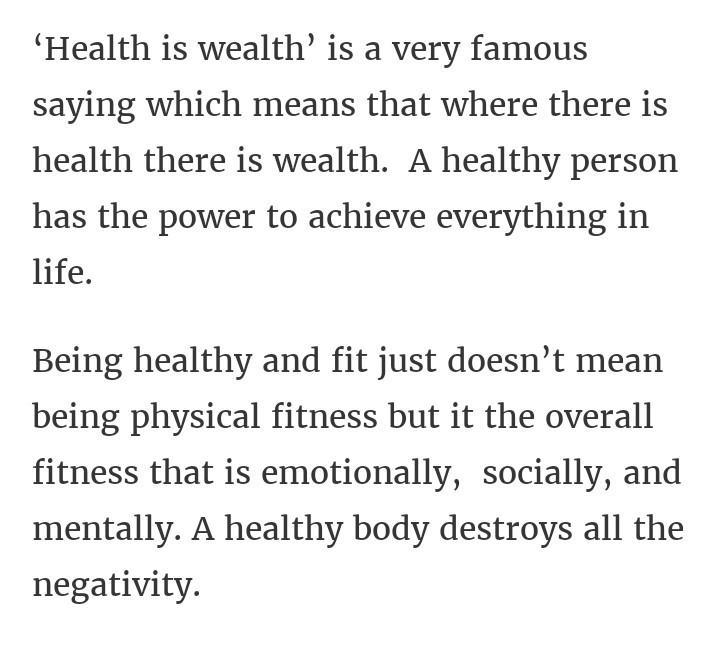 |
‘Health is wealth’ is a very famous saying which means that where there is health there is wealth. A healthy person has the power to achieve everything in life. Being healthy and fit just doesn’t mean being physical fitness but it the overall fitness that is emotionally, socially, and mentally. A healthy body destroys all the negativity. |
Articles | |
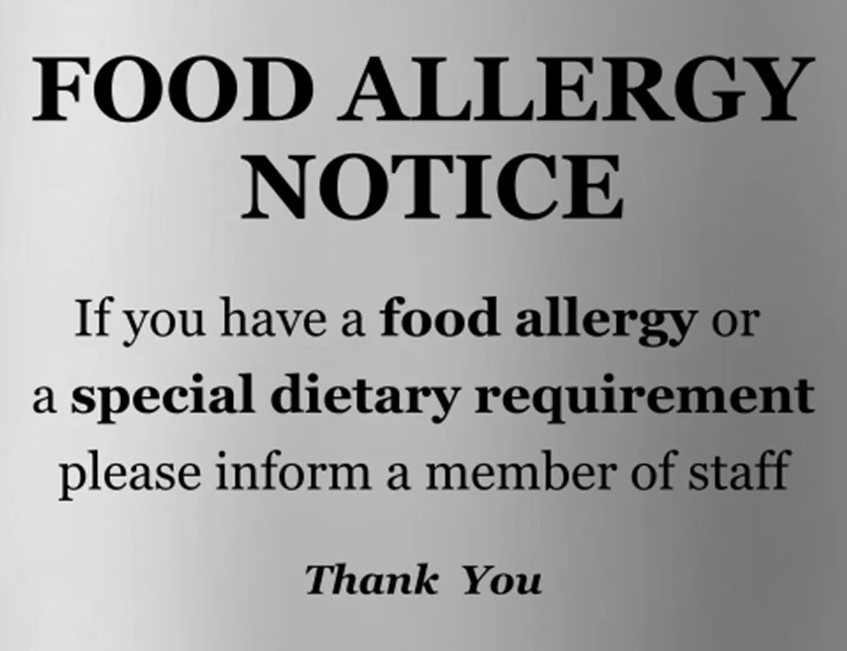 |
FOOD ALLERGY NOTICE If you have a food allergy or a special dietary requirement please inform a member of st Thank You |
Real world signs | |
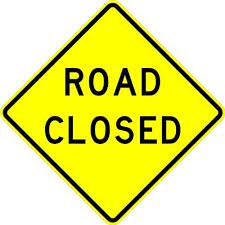 |
ROAD CLOSED | Real world signs | |
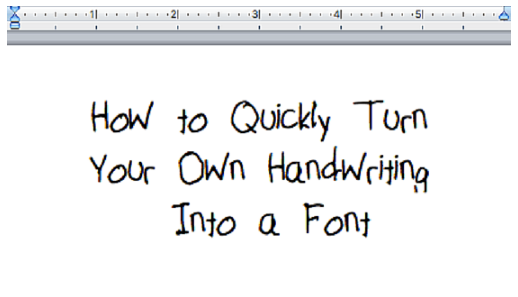 |
How jo Quickly Turn Your Own Handwriting Into a Font |
Handwritten texts |
Evaluation
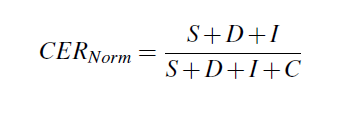
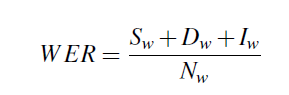
We evaluated the accuracy of text retrieved from image using recognition rate, and error rate. Our OCR model performance is evaluated by calculating Normalized Character Error Rate (CERNorm) and Word Error Rate (WER). These metrics show the extent to which our OCR module transcribed text and how the ground truth text differ from each other. CER and WER represent the number of character/word substitutions or deletions, or insertions needed to transform one word/sentence into another respectively. Both of these quantitative metric systems are based on the Levenshtein distance.
where,
- S/Sw : Number of substitution of characters/words
- D/Dw : Number of deletion of characters/words
- I/Iw : Number of insertion of characters/words
- C : Number of correct characters in case of CER(Norm)
- Nw : Total number of words in the reference in case of WER
We have considered a dataset of 200 images containing English letters in .jpg format with their equivalent text saved in .txt files to evaluate our solution. The dataset also contains difficult images, like images with high noise or blurriness. As we evaluated our solution over the dataset, we obtained a Normalized Character Error Rate score of 6.58% and Word Error Rate score of 18.91%. Our solution achieved an accuracy of around 88.33% in terms of character recognition rate over the testing dataset. With our sample input data, we found that our image pre-processing techniques takes less time than OCR or TTS.
We have evaluated our text to speech solution. As we saw earlier in the results section the TTS was fairly accurate in reading the text. However, there were some discrepancies in the audio files. After some more testing we found that these audio files could be fixed simply by adding a period at the end of the sentence.
Here is the adjusted audio file for the food allergy text:
Here is the adjusted audio file for the road sign text:
This raises the question on what is truly wrong with the TTS solution, as it seems that it can handle most of the text that comes its way. Perhaps this problem could be solved by training our own models, but this problem may stem from a deeper issue caused by the source code. Furthermore, it seems that after some further testing the discrepancies seem to occur at random. For example, the TTS struggled with the singular words 'You' and 'Road', but after using these words in a sentence like 'How are you today' the discrepancy disappeared, regardless of the punctuation. Ultimately, further research is required in order to fully debug the TTS solution, but in its current state it is accurate enough for our purposes.
Conclusion
We have devised an end-to-end image to speech translation solution. In addition to the image pre-processing done in Tesseract OCR, we added further pre-processing techniques which improvised the text extracted from images as shown in the above results. This solution provides better results and recognition rate with handwritten texts/noisy images.
Future Work
In this project, we have only considered the alpha-numeric data associated with the image. To extend this study, we can also consider the signs, symbols, diagrams associated with the image to generate speech to provide a complete information. Image pre-processing techniques can be enhanced further to reduce the obtained error rate while extracting text from image.
References
- https://github.com/coqui-ai/TTS
- Ackland P, Resnikoff S, Bourne R. World blindness and visual impairment: despite many successes, the problem is growing. Community Eye Health, 2017.
- Karun Somasunder M, Amal J.S, Gopal Gopakumar, Suraj V Thomas, and Keerthi Krishnan. Text to speech conversion using google vision api. National Conference on Smart Systems and Technologies, 2021.
- Yasuhisa Fujii. Optical character recognition research at google. IEEE 7th Global Conference on Consumer Electronics (GCCE), 2018.
- Yuxuan Wang, RJ Skerry-Ryan, Daisy Stanton, Yonghui Wu, Ron J. Weiss, Navdeep Jaitly, Zongheng Yang, Ying Xiao, Zhifeng Chen, Samy Bengio†, Quoc Le, Yannis Agiomyrgiannakis, Rob Clark, and Rif A. Saurous. Tacotron: a fully end-toend text-to-speech synthesis model. arXiv preprint arXiv:1703.10135, 2017.
- https://github.com/tesseract-ocr/tesseract
- Jian Zhang, Renhong Cheng, Kai Wang, Hong Zhao, “Research on the text detection and extration from complex images”, Fourth International Conference on Emerging Intelligent Data and Web Technologies. Vol. 10, 2013, Page no. 708-713.